Golf App With 3D Shot Replay
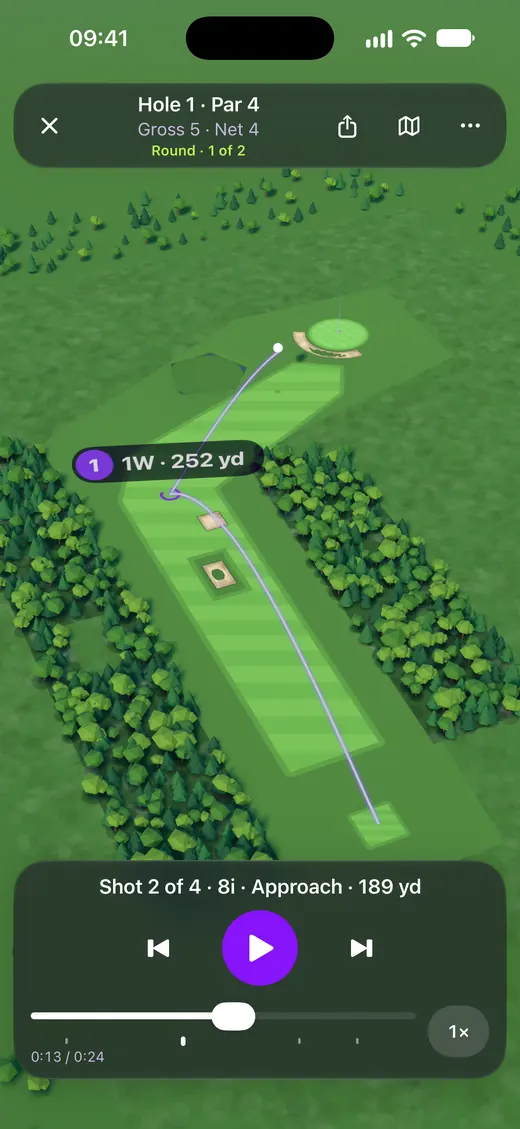
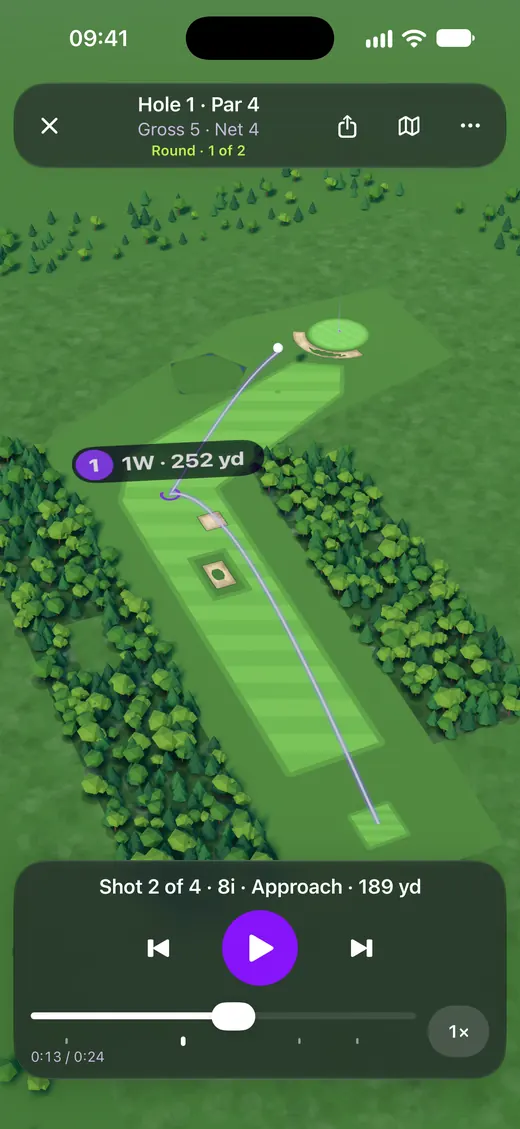
Golfonaut replays your round in 3D on iPhone: every shot you record on Apple Watch flies across a 3D model of the hole, from where you hit it to where you played the next one. Watch one hole or the whole round, follow the ball or see the hole from above, and share it as a video.
By the Golfonaut team, who make the app · Updated · Checked against the Golfonaut iPhone app on 17 November 2026
Which golf app has 3D shot replay?
Golfonaut, an Apple Watch and iPhone golf app, replays each round in 3D from the shots you record on your watch, with no sensors on your clubs. 3D replay is part of the optional Private Club subscription; Golfonaut is free to download with no ads, and recording your shots is free.
Most apps that come up for “3D replay” replay your swing, filmed on your phone or read from a sensor. Golfonaut replays the round: which club you hit, where each shot finished and how you played the hole. How shots are recorded is in how to track golf shots on Apple Watch, and how other watch apps compare is in the best Apple Watch golf apps compared.
How do I replay my golf round in 3D?
| Step | What you do |
|---|---|
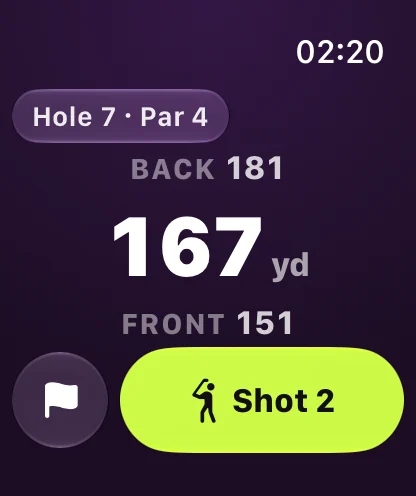
| Record the round on Apple Watch | Before each shot, tap Ready for shot and pick the club. The watch saves where you hit from, and the next shot fills in where the last one finished. |
| Open the round on iPhone | Tap Replay on the round summary. You can replay one hole or the whole round; holes with no recorded shots are skipped. |
| Watch it in 3D | Each shot flies over a 3D model of the hole. Switch between an overview of the hole and a camera that follows the ball. |
| Share it | Tap Share video to make an upright video of up to 45 seconds of play and send it from the share sheet. |
A shot needs a start and a finish to appear in the replay. The finish of each shot is where you started the next one, so a shot you forgot to record leaves a gap. Tapping Add previous shot on the watch fills it in during the round. Penalty strokes show on the ground where they happened.
What does the 3D replay show?
Each hole is drawn as a 3D model from its mapped outline: striped fairway, raised green and tee, sunken bunkers, water and trees. The ball flies between your recorded positions, and the overview camera shows the whole hole while the follow camera rides behind the ball.
Two things to know: the app has each shot’s start and finish, not its height or curve, so the arc is drawn for effect, and the ground shape comes from the course outline rather than a survey of real slopes. For distances by club, use the golf club distance chart.
Round replay or swing replay: which do I need?
| Golfonaut round replay | Swing replay apps | |
|---|---|---|
| What it replays | Your whole round, shot by shot, on a 3D model of each hole | Your swing, from video or sensors |
| Where the data comes from | Apple Watch GPS: where each shot started and finished | Phone camera or a swing sensor |
| Best for | Seeing how you played each hole and sharing the round | Fixing swing positions and tempo |
If you want to fix your swing, a swing replay app or a lesson will help more; Golfonaut does not film or draw your swing. What it adds to each shot you record is a swing speed from the watch, with Private Club, explained in how to measure golf swing speed on Apple Watch, and a scorecard for the round, which you can also keep on paper with the online golf scorecard.
Is 3D replay free in Golfonaut?
| Feature | Plan |
|---|---|
| Recording shots and clubs on Apple Watch | Free |
| Distance to the middle of the green | Free |
| 3D replay of a hole or the whole round | Private Club |
| Share video of the replay | Private Club |
| Swing speed on the shot screen | Private Club |
Replay your next round in 3D
Golfonaut is free on the App Store with no ads. It needs an iPhone on iOS 18 or later and an Apple Watch on watchOS 26 or later.
Try GolfonautGolfonaut is on iPhone for now. Android is coming soon.Or get Golfonaut on the App Store
How we checked: everything on this page was read from the Golfonaut iPhone and Apple Watch app source on 17 November 2026 (how the 3D hole is built, how shots are placed, the cameras, the video export and which plan includes it), together with the App Store listing.