How to Track Golf Shots and Stats on Apple Watch
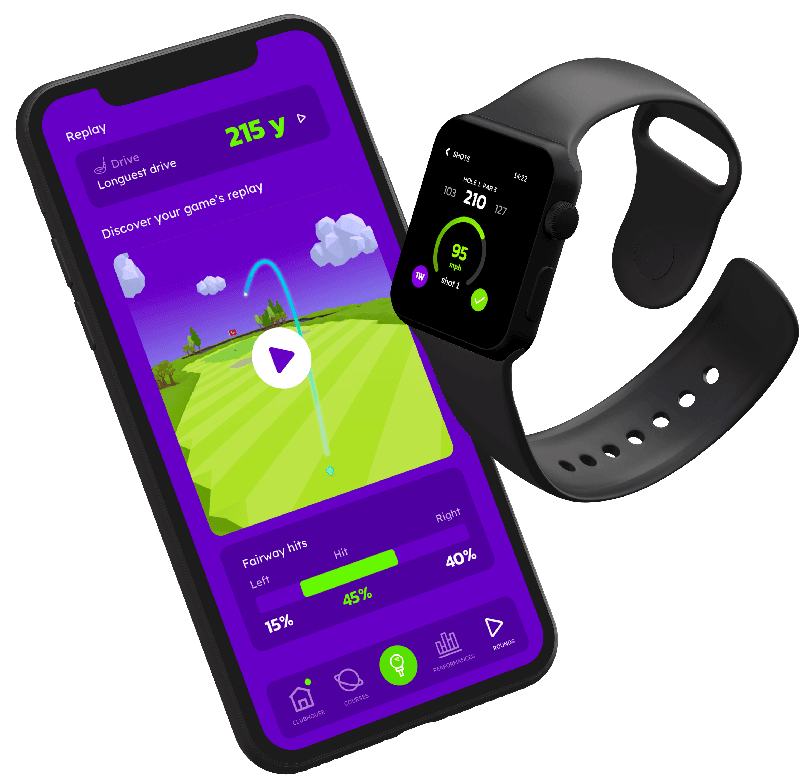
To track golf shots on Apple Watch with Golfonaut, start the round on your iPhone in Shot by Shot mode, then tap Ready for Shot on the watch before each shot and pick the club. The watch saves where you hit from and measures each shot’s distance when you record the next one. Your iPhone then turns the round into fairway, green and putting stats.
By the Golfonaut team, who make the app · Updated · Checked against Golfonaut 2.21 for iPhone and Apple Watch
Which Apple Watch golf app tracks shots with one tap?
Golfonaut records a shot on Apple Watch with one tap on Ready for Shot, then a tap on the club you are hitting. The watch saves your GPS position at that moment. You do not have to confirm the shot: once you walk more than about 10 metres away (about 5 metres if the watch detected a swing), it is saved and its distance is filled in when you record the next one.
It isn’t automatic: nothing is logged unless you tap, and there are no sensors on your clubs. Other Apple Watch golf apps work differently; how Golfonaut, Hole19 and 18Birdies compare on the watch is in our side-by-side comparison.
How do I start tracking a round?
- Open Golfonaut on your iPhone at the course and pick the course from the list. The app only starts a round within about 1 km of the club, or on the mapped course.
- Choose an input mode (table below). Shot by Shot is the default and the only one that records each shot.
- Choose stroke play or Stableford, your tees and your handicap for the round.
- Tap Start game. The iPhone opens the round on your Apple Watch as a golf workout, so the watch app must be installed and the watch within reach of the phone.
Which tracking mode should I use?
| Mode | What you log | Best for |
|---|---|---|
| GPS Only | Nothing. You get distances to the green and no scorecard. | Casual rounds where you only want yardages |
| Scoring | Your score at the end of each hole, picked on a wheel with Birdie, Par and Bogey labels. | A digital scorecard with net and Stableford options |
| Shot by Shot (default) | Every shot: tap Ready for Shot, pick the club, and putts on their own screen. | Club distances, fairways, greens in regulation, putting stats and 3D replays |
What does the watch record for each shot?
| Data | How it is captured |
|---|---|
| Where you hit from | GPS position saved when you tap Ready for Shot |
| Club | Picked from six suggested clubs, ordered by which usually covers your distance to the green, plus Penalty and Others |
| Shot distance | Measured from this shot’s position to the next one and shown in the shot list |
| Shot type | Tee or fairway shot, chip (inside 30 metres of the green), sand shot, putt or penalty |
| Swing speed | Read from the watch’s motion sensor; the on-watch gauge is part of Private Club |
| Penalties | Lost ball, water, out of bounds, unplayable or other, saved straight away |
Picked the wrong club? Tap the shot in the list to change it or delete it. Forgot a shot? Tap Add previous shot to add it by shot number and club. It won’t have a GPS position.
How do I record putts and finish a hole?
Choose Putt in the club list for your first putt. The watch switches to a putting screen where each Ready for Putt tap saves the next putt at your current spot. When the ball drops, tap In the hole, then Hole is here while you stand at the cup: that marks the flag so the app can work out how far each putt was.
Holes are a list on the watch rather than detected by GPS. In Shot by Shot the list scrolls to your next unplayed hole and you tap it; in Scoring mode the next hole opens on its own after you enter a score. Give up hole records par plus two, plus your handicap strokes, or 0 Stableford points.
Which golf stats can I see after the round?
The iPhone checks where each shot finished against the course’s fairway, green and bunker outlines, so fairways and greens in regulation are counted for you instead of being ticked by hand. Golfonaut is free to download with no adverts; the detailed stats are part of the optional Private Club subscription.
| Feature | Plan |
|---|---|
| Distance to the centre of the green | Free |
| Shot list with each shot’s club and distance | Free |
| Gross score, stroke play or Stableford points | Free |
| Distances to the front and back of the green | Private Club |
| Live distance from your last shot as you walk | Private Club |
| Fairways hit (with left and right misses), greens in regulation | Private Club |
| Up and down, sand saves, putts per hole, putts from 1 m and 3 m | Private Club |
| Scoring spread and average score on par 3s, 4s and 5s | Private Club |
| Average distance per club | Private Club |
| Net score and net Stableford points | Private Club |
| 3D replay of the round | Private Club |
Average club distances are the input for mapping the gaps in your bag, and the scoring stats show where strokes go when you are working on your Handicap Index.
Do I need my iPhone with me during the round?
You need the iPhone to start, because the course is chosen there. After that, distances are worked out on the watch from its own GPS using course data sent at the start, and shots are kept on the watch and sent to the iPhone when they reconnect. Fairway and green stats wait until the shots reach the phone. We have not published a test of a whole round with the phone left behind, so keep it in your bag if you can.
Each round is also saved as an Apple Watch golf workout when the workout setting is on, so heart rate and active calories go to the Health app. The round ends when you tap End game on the iPhone, or on its own once the watch is about 1.5 km past the greens.
Track your next round on Apple Watch
Golfonaut is free on the App Store with no adverts. It needs an iPhone and an Apple Watch.
Get Golfonaut on the App Store
Scan with your iPhone camera
Get Golfonaut on the App Store
Requires iPhone and Apple Watch
How we checked: every step and feature on this page was read from the Golfonaut iPhone and Apple Watch app source for version 2.21 on 27 October 2026, together with the App Store listing. Menu names are the ones the app shows in English.